Made a Github Repository
These steps create a repository on Github. For now, I am just using that as an extra backup for the website files. There is a lot more that you can do with Github, but I'm not quite there yet. The first step is to make a file that tells Github what to ignore. I did not want to save all the stuff that Node and Eleventy generate automatically (there is a lot of that).
- In the top-level
/Websitefolder (the same folder were.eleventy.jslives), made.gitignore. - Added a version of the code from the Learn Eleventy .gitignore example. They call their output folder
/distand I call mine/public, so my code looks like this:
# Misc
*.log
npm-debug.*
*.scssc
*.swp
.DS_Store
.sass-cache
.env
.cache

# Node modules and output
node_modules
public
- Made a Github account.
- Connected VS Code to the Github account.
- In the Source Control section of VS Code, clicked "Initialize Repository." It looks like this:
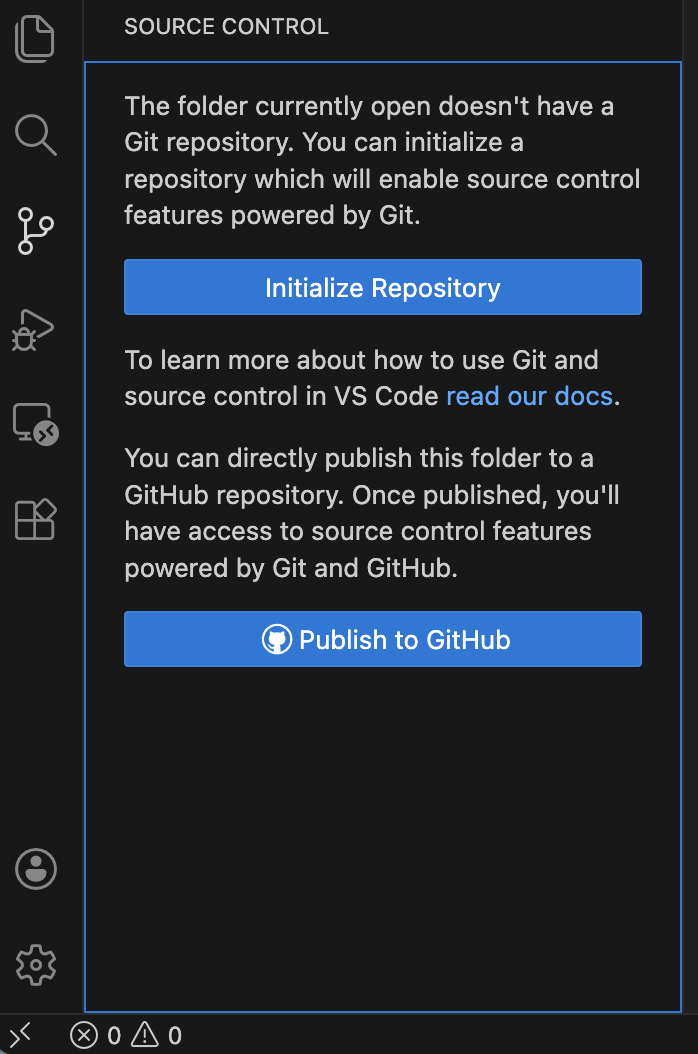
- This brings up a spot for a message and a "Commit" button. I typed "First Commit" in the message, then clicked the button.
- After clicking "Commit," the button changes to "Publish to Branch" with another comment field. I wrote "The first Publish Branch for my website." and I clicked the button. This brought me to a pull down asking if the branch should be public or private. I clicked public.
- This saved the website files to Github and prompted me to visit the repository page where they are saved. Once there, Github prompted me to add a README file. Again, I pushed the button. This created
README.mdin the repository. - On the Github website, I added some content to
README.md, clicked "Commit changes...", and clicked through the prompts. You can read that file, and see the repository here. - Back on VS Code, I synchronized the changes. This brought
README.mdonto my computer in/Websiteand made that file visible in VS Code.
With these steps complete, when I make changes in the website, I am able to sync those changes with Github to back them up. VS Code also highlights anything that is new and not synced. And, if I make any major mistakes, I am able to use Github to go back to prior versions. Or, at least I think that is true. I'm a novice.